Configuration
The configuration of ubTrace is divided in two parts:
Server configuration: Runtime settings for the ubTrace deployment. In the current NestJS-based stack (v1.0.0+), the server is configured through environment variables in the
.envfile anddocker-compose.yml. See Installation for the full list of environment variables.Project configuration: Project-specific options, which are taken from the currently selected/viewed project only. It allows to have project-specific colors, layouts and other important features. Stored inside
ubtrace_project.tomland partly inconf.py.
Server Options (Legacy)
Deprecated since version 1.0.0: The ubtrace_server.toml options and UBTRACE_SERVER_* environment variables
below apply to the legacy Python-based ubTrace server (pre-1.0) and have no
effect in the current NestJS-based stack.
The current stack (v1.0.0+) is configured through the .env file with variables
such as OIDC_ISSUER, DATABASE_URL, REDIS_HOST, etc.
See Installation for the complete environment variable reference.
Legacy ubtrace_server.toml options (click to expand)
The options below were stored inside ubtrace_server.toml and used by the legacy
Python server. The file is still generated by the Sphinx builder but is no longer
read by the NestJS backend. Project discovery is based solely on
ubtrace_project.toml files.
project_src_dir: Absolute path to root directory of project source files. Env:UBTRACE_SERVER_PROJECT_SRC_DIRdb_path: SQLite database file path (.dbextension). Env:UBTRACE_SERVER_DB_PATHdb_mode: Database init mode (new,wipe,update). Env:UBTRACE_SERVER_DB_MODEdefault_org: Default organization ID. Env:UBTRACE_SERVER_DEFAULT_ORGdefault_project_id: Default project ID. Env:UBTRACE_SERVER_DEFAULT_PROJECT_IDdefault_project_version: Default project version. Env:UBTRACE_SERVER_DEFAULT_PROJECT_VERSIONmulti_project: Enable multi-project support (true/false). Env:UBTRACE_SERVER_MULTI_PROJECTdir_layout: Directory layout (simpleorversioned). Env:UBTRACE_SERVER_DIR_LAYOUTauth_required: Enable authentication (true/false). Env:UBTRACE_SERVER_AUTH_REQUIREDenable_project_scoped_auth: Scope auth to individual projects. Env:UBTRACE_SERVER_ENABLE_PROJECT_SCOPED_AUTHauth_client_id: OIDC client ID. Env:UBTRACE_SERVER_AUTH_CLIENT_IDauth_client_secret: OIDC client secret. Env:UBTRACE_SERVER_AUTH_CLIENT_SECRETauth_issuer_url: OIDC issuer URL. Env:UBTRACE_SERVER_AUTH_ISSUER_URLauth_discovery_url: OIDC discovery endpoint URL. Env:UBTRACE_SERVER_AUTH_DISCOVERY_URLauth_access_token_params: Additional access token request params (JSON). Env:UBTRACE_SERVER_AUTH_ACCESS_TOKEN_PARAMSauth_authorize_params: Additional authorization request params (JSON). Env:UBTRACE_SERVER_AUTH_AUTHORIZE_PARAMSchat_enabled: Enable AI chat feature (true/false). Env:UBTRACE_SERVER_CHAT_ENABLEDopenrouter_apikey: API key for OpenRouter AI service. Env:UBTRACE_SERVER_OPENROUTER_APIKEYsearch_enabled: Enable search (true/false). Env:UBTRACE_SERVER_SEARCH_ENABLEDdebug: Enable debug mode (true/false). Env:UBTRACE_SERVER_DEBUGsecurity_config_file: Path to RBAC config TOML file. Env:UBTRACE_SERVER_SECURITY_CONFIG_FILEsidebar_apps_config: Sidebar app URLs (dashboard, traceability_tree). Env:UBTRACE_SERVER_SIDEBAR_APPS_CONFIG
Project Options
Project-specific configuration is stored in a file called ubtrace_project.toml.
This file is normally available after the ubtrace Builder has built the documentation.
For convenience reasons the options from ubtrace_project.toml can be also set
in the conf.py file of the project, which allows to deal with all documentation-related
tasks in the Sphinx-way of doing things.
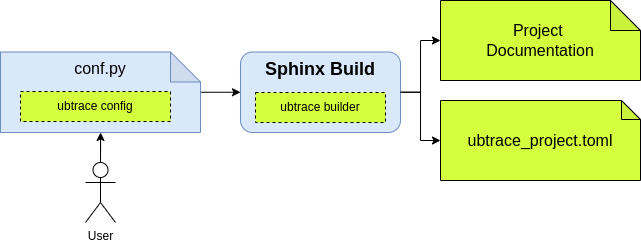
ubTrace configuration flow
ubtrace_project.toml Example
[ubtrace]
enable_website_mode = false
header_navigation_links = []

[ubtrace.docs_sources]
"/dev/architecture" = ".rst"
"/dev/autodiscover" = ".rst"
"/dev/changelog" = ".rst"
"/features/multi_project" = ".rst"
"/index" = ".rst"
"/installation" = ".rst"
"/license" = ".rst"
"/quickstart" = ".rst"
"/usage/sphinx/configuration" = ".rst"
"/usage/sphinx/index" = ".rst"
"/usage/sphinx/protection" = ".rst"
"/usage/sphinx/users" = ".rst"
"/usage/ubt_server" = ".rst"

[ubtrace.global_nav_extra]

[ubtrace.hide_left_sidebar]

[ubtrace.hide_right_sidebar]
"/usage/sphinx" = true

[ubtrace.page_header_styles]
minimal = []
modern = []

[ubtrace.project]
author = "team useblocks"
base_url = "."
copyright = "2025, team useblocks"
html_favicon = "_static/favicon.ico"
html_logo = ""
name = "ubtrace"
organization = "useblocks"
project_id = "ubtrace_docs"
root_doc = "index"
version = "1"

[ubtrace.secure]

[ubtrace.secure_perms]

[ubtrace.theme_options]
content_theme = "alabaster"
edit_uri = "/edit/main/docs/source/"
header_style = "modern"
hide_left_sidebar = false
hide_right_sidebar = false
mode = ""
name = ""
repo_url = "https://github.com/example/repo"
view_source_uri = "/blob/main/docs/source/"

[ubtrace.theme_options.content_theme_options]

[ubtrace.theme_options.html_sidebars]
"**" = ["localtoc.html"]

[ubtrace.theme_options.logo]
desktop = ""
mobile = ""
ubtrace_build_kuzudb
Deprecated since version KuzuDB: generation is no longer needed. The backend now uses PostgreSQL + Elasticsearch
with NDJSON files generated by the ubt-coverage Rust CLI. This option is ignored
and will be removed in a future release.
Option to enable or disable the build of the Kuzu database.
Default: False.
ubtrace_enable_website_mode
Option to enable or disable the website mode feature for a ubt_sphinx
project. This option accepts a boolean value (True/False).
Note
When you set the ubtrace_enable_website_mode option to True,
the following changes will be applied to the website:
The left sidebar area will be removed.
The right sidebar area will be removed.
The “Edit” and “View Source” links will be removed from the top of the page.
Default: False
Usage
# File: conf.py
ubtrace_enable_website_mode = True
Important
It is recommended to configure the header_navigation_links
and the header_style configuration options, when
you set the ubtrace_enable_website_mode option to True. This
ensures that there is sufficient data available to create the
navigation links. Otherwise, the website will not have any navigation
links in the header.
ubtrace_organization
Option to set the organization ID for a ubt_sphinx multi-project instance.
Default: user.
ubtrace_project
Option to set the project ID for a ubt_sphinx multi-project instance.
Default: project.
ubtrace_version
Option to set the version ID for a ubt_sphinx multi-project instance.
Default: 1.
ubtrace_theme_options
A dictionary of options that influence the look and feel of the ubTrace theme.
Usage
# File: conf.py
ubtrace_theme_options = {
   "content_theme": "sphinx_immaterial",
   "content_theme_options": {},
   "edit_uri": "edit/main/docs/",
   "global_nav_extra": {
      "ubtrace_site": {"name": "ubTrace Main", "url": "https://www.ubTrace.com/"},
   },
   "header_navigation_links": [
      {
         "title": "Documentation",
         "url": "/docs/",
      },
      {
         "title": "ubTrace Website",
         "children": [
            {
               "title": "Home",
               "url": "https://www.ubTrace.com/",
               "class": "border border-white",
            },
            {
               "title": "Components",
               "url": "https://www.ubTrace.com/components/",
            },
         ],
      },
      {
         "title": "Our Story",
         "url": "https://www.ubTrace.com/our-story/",
      },
   ],
   "header_style": "modern",
   "hide_left_sidebar": False,
   "hide_right_sidebar": True,
   "html_sidebars": {"**": ["localtoc.html"]},
   "logo": {"desktop": "" or {}, "mobile": "" or {}},
   "mode": "dark",
   "name": "ubtheme",
   "repo_url": "https://github.com/useblocks/app",
   "view_source_uri": "/blob/main/docs/",
}
Below are the options understood by the ubTrace theme.
content_theme
The content_theme option sets the HTML “theme” to use when
building with the Sphinx HTML builder. This option’s value is set as
the value for the html_theme Sphinx config.
Default: 'alabaster'.
Usage
# File: conf.py
ubtrace_theme_options = {
   "content_theme": "sphinx_immaterial",
}
content_theme_options
The content_theme_options option sets the HTML “theme” options to
use when building with the Sphinx HTML builder. This option’s value is
set as the value for the html_theme_options
Sphinx config.
Default: {}.
Usage
# File: conf.py
ubtrace_theme_options = {
   "content_theme_options": {},
}
edit_uri
The edit_uri option sets the URL segment for the “Edit” icon in
the documentation. When combined with repo_url, it
creates a link that allows users to edit the source file of any
documentation page.
The value for edit_uri typically follows the format "edit/<branch name>/<docs source folder>".
Default: "" (empty string, which disables the “Edit” icon)
Note
The “Edit” icon only appears when all these conditions are met:
The repo_url option is set
The page doesn’t have the
:hide_edit_link:metadataThe docs sidebar app is selected as the ubtrace sidebar app
Usage
# File: conf.py
ubtrace_theme_options = {
   "edit_uri": "edit/main/docs/source/",
}
header_style
The header_style option specifies the styling of the documentation
header. Currently, it accepts two values: minimal or modern.
Default: "modern"
minimal- The minimal header style integrates the data from the header_navigation_links configuration into the documentation’s header as navigation links. This style is recommended for pages intended to serve as landing pages.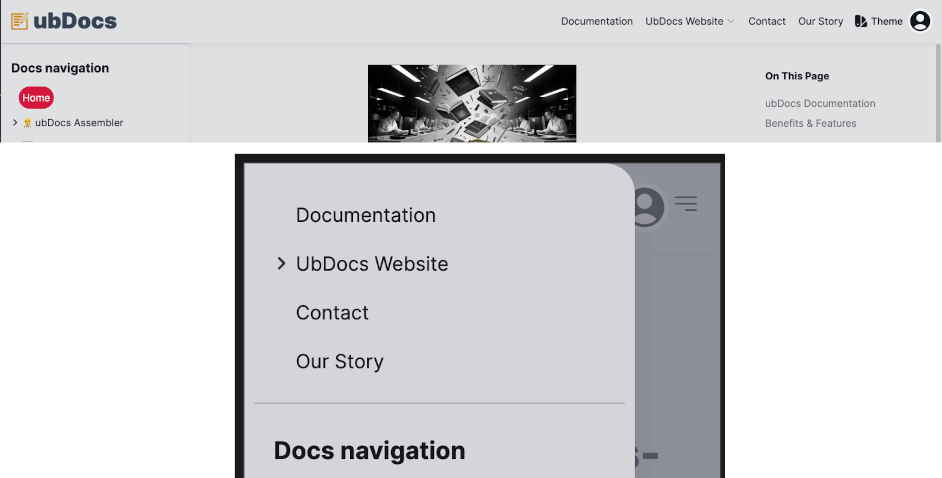
Desktop & Mobile view for the minimal header style
modern- The modern header style offers a simple and elegant design, making it an ideal choice for documentation pages. It is the default setting for theheader_styleoption.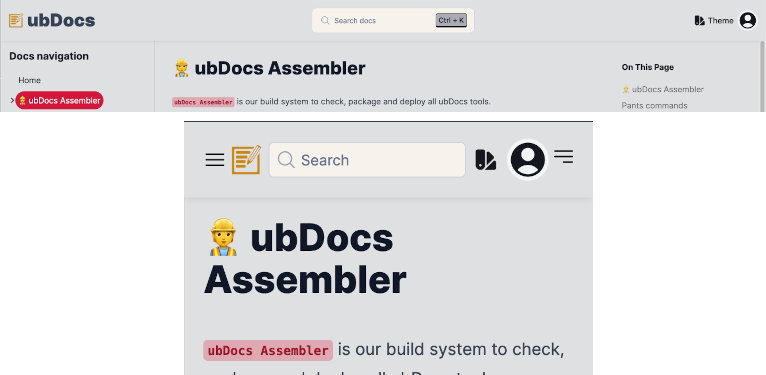
Desktop & Mobile view for the modern header style
Usage
# File: conf.py
ubtrace_theme_options = {
   "header_style": "minimal",
}
Note
If a page sets the header_style metadata option, it takes precedence over this option.
logo
The logo option sets the website logo for both mobile and desktop
screens. You can also set the logo for both light and dark modes for
either desktop or mobile screens.
This option accepts the following key-value pairs:
mobile (the logo to use for small screens) - path to mobile logo file
desktop (the logo to use for large screens) - path to desktop logo file
or it also accepts:
mobile (the logo to use for small screens) - a dictionary containing the logos for both light and dark modes
desktop (the logo to use for large screens) - a dictionary containing the logos for both light and dark modes
Note
The logo file path must be a relative path to the documentation source directory.
The logo file can be any of the image formats supported by Sphinx.
We use the html_logo Sphinx config value, if you don’t provide a logo for either the desktop or mobile screens.
Default: {"desktop": "", "mobile": ""}.
Usage
# File: conf.py
ubtrace_theme_options = {
   "logo": {
      "desktop": "_static/azuredevops-logo-dk.png",
      "mobile": "_static/azuredevops-logo-mb.png",
   },
}

# OR

# File: conf.py
ubtrace_theme_options = {
   "logo": {
      "desktop": {
            "light": "_static/useblocks_light.svg",
            "dark": "_static/useblocks_dark.svg",
      },
      "mobile": {
            "light": "_static/useblocks_mobile_light.svg",
            "dark": "_static/useblocks_mobile_dark.svg",
      },
   },
}
name
Important
The name option is deprecated in the latest version.
Use the name option to set the theme for the website. You can
choose from one of the supported themes listed below:
“skeleton”
“wintry”
“modern”
“rocket”
“seafoam”
“vintage”
“sahara”
“hamlindigo”
“gold-nouveau”
“crimson”
“ubtheme”
Note
Depending on the value you provide for the name option, we apply
the following changes to the website:
If you don’t specify the
nameoption inconf.py, we use the most recent theme stored in your browser.If you specify the
nameoption inconf.pyand the value is a supported theme, we use that theme and remove the theme menu from the website’s theme settings drawer.If you specify both the mode and
nameoptions, we remove the theme settings tab from the navbar and the theme settings drawer.
Default: "" (i.e., an empty string).
Usage
# File: conf.py
ubtrace_theme_options = {
   "name": "ubtheme",
}
mode
Important
The mode option is deprecated in the latest version.
Use the mode option to set the theme mode for the website. This
option accepts only two values:
“dark”
“light”
Note
Based on the value you provide for the mode option, we apply the
following changes to the website:
If you don’t specify the
modeoption inconf.py, we set the theme mode to light mode by default.If you specify the
modeoption inconf.pywith either “dark” or “light”, we use the specified mode and remove the theme mode switch from the website’s theme settings drawer.If you specify both the
modeand the name options, we remove the theme settings tab from the navbar and the theme settings drawer.
Default: "" (i.e., an empty string).
Usage
# File: conf.py
ubtrace_theme_options = {
   "mode": "dark",
}
repo_url
The link to the repository where the documentation source files are stored. This option is required to enable both the “Edit” and “View Source” links in the documentation.
The value for repo_url typically can be a URL to a repository
hosting service such as GitHub, GitLab, or Bitbucket.
Default: "" (empty string, which disables the “Edit” and “View
Source” links)
Usage
# File: conf.py
ubtrace_theme_options = {
   "repo_url": "https://github.com/useblocks/app",
}
view_source_uri
The view_source_uri option sets the URL segment for the “View
Source” icon in the documentation. When combined with repo_url,
it creates a link that allows users to view the source code of any
documentation page.
The value for view_source_uri typically follows the format "/blob/<branch name>/<docs source folder>".
Default: "" (empty string, which disables the “View Source” icon)
Note
The “View Source” icon only appears when all these conditions are met:
The repo_url option is set
The page doesn’t have the
:hide_view_source_link:metadataThe docs sidebar app is selected as the ubtrace sidebar app
Usage
# File: conf.py
ubtrace_theme_options = {
   "view_source_uri": "/blob/main/docs/",
}
ubtrace_secure_perms
Define permissions to use for secured pages or folders.
The value for the secure_perms is a list of dictionaries and can be aggregated from the “secure.permissions” key in the ubtrace_project.toml file.
Usage
# File: ubtrace_project.toml
[[secure.permissions]]
perm_uid = "lic_user"
name = "License User"
description = "Read pages open to license users"
level = "read"
# File: conf.py
ubproject_toml = tomllib.loads("ubtrace_project.toml").read_text("utf8")
ubtrace_secure_perms = ubproject_toml["secure"]["permissions"]
# OR
ubtrace_secure_perms = [
   {
      "lic_user": {
         "name": "License User",
         "description": "Read pages open to license users",
         "level": "read",
      },
   },
]
ubtrace_secure_pattern
Define regular expression for secured page or folder with user role. The value for the roles must be one or more user roles defined in the security configuration (Keycloak realm roles).
Usage
# File: conf.py
ubtrace_secure_pattern = {
   "user_manuals/ubm/": ["authenticated"],
   "^ukcs\S+HONEY$": ["int_developer"],
}
Page Metadata Options
In ubTrace, we use the Sphinx page metadata feature to set predefined or custom fields that provide information about a specific document.
This metadata is typically defined at the top of a reStructuredText (reST) file and can include a variety of details that influence how the page is processed or displayed.
The list of page metadata options supported by ubTrace Sphinx are:
header_style
The header_style metadata option specifies the header style to use
for a particular page. It accepts only two values: minimal or modern.
This option works just like the header_style option under the ubtrace_theme_options configuration.
To set the header style of a page, you can add the header_style
option to the top of the page using the syntax below:
Usage
:header_style: minimal
---
header_style: minimal
---
Note
If a page sets the header_style metadata option, it takes precedence over the header_style option under the ubtrace_theme_options configuration.
hide_edit_link
When specified, this option hides the “Edit” link at the top of the page. By default, the “Edit” link appears if the edit_uri option is set in the configuration. This metadata option overrides the global setting for the current page.
Usage
:hide_edit_link:
---
hide_edit_link: true
---
Tip
This option is commonly used on automatically-generated pages since they don’t have an editable source document.
hide_view_source_link
When enabled, this option hides the “View Source” link at the top of the page. By default, the “View Source” link appears if the view_source_uri option is set in the configuration. This metadata option overrides the global setting for the current page.
Usage
:hide_view_source_link:
---
hide_view_source_link: true
---