Dynamic Analysis
ubTrace provides the powerful advantage of dynamic analysis, enabling on-the-fly answers to traceability-related questions.
While the standard Sphinx/sphinx-Needs workflow requires code changes,
creating a git commit, and going through a review process for
updates to any Sphinx-Needs-related analysis page, ubTrace allows users
to filter data and generate views without any code modifications.
This makes ubTrace ideal for quick answers and easy usability, even for non-technical users.
Traceability Tree
The ubTrace traceability feature is the best choice for analyzing the connections between different Sphinx-Needs objects in a documentation.
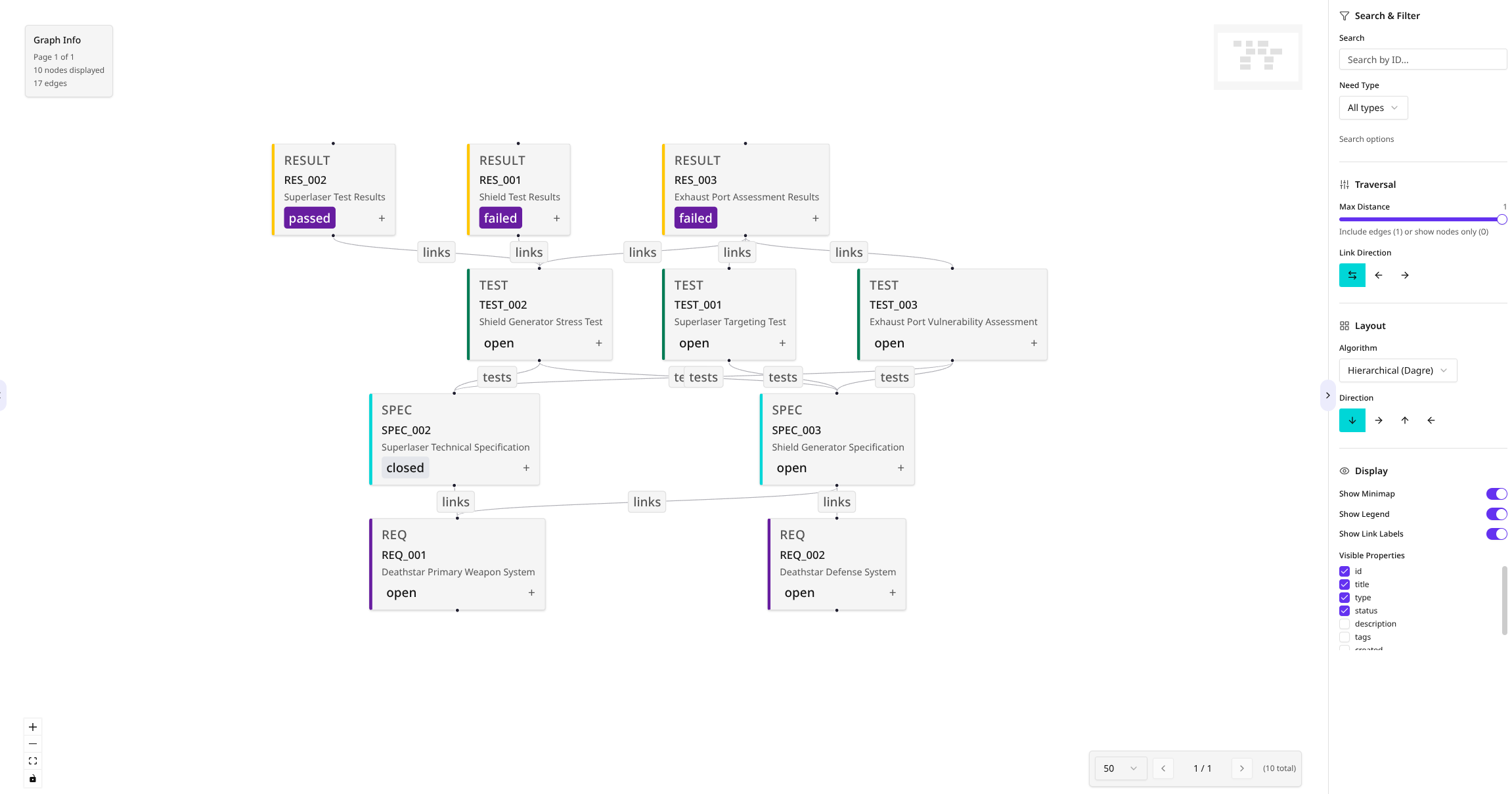
Key features include:
Filtering: Easily filter objects by text values and types.
Interactive Tree: Zooming and moving the tree are supported for better visualization.
Color Coding: All objects and their connections are color-coded based on their type.
Customizable Data: Additional data, such as
statusandtype, can be displayed alongside default values likeIDandtitle.Configurable Depth: The number of connected objects shown can be adjusted using the
Max. distancesetting.
The Traceability tree displays data for the currently selected project and version. If Multi-Project Support is activated, the project selection at the top of the page can be used to switch the data context.
Edge Colors by Link Type
In addition to coloring objects by type, the connections between them are colored by their link type, making it easy to tell different kinds of relationships apart at a glance.
Show Edge Colors: A toggle in the Display settings turns link-type edge coloring on or off, independently of the Show Link Labels toggle.
Link Types panel: A sidebar panel lists every link type present in the current view. Each entry shows the type’s color swatch, its name, and the number of edges of that type, so the panel doubles as a legend.
Per-type visibility: Use the checkbox next to each link type to hide or show its edges. Newly discovered link types stay visible by default, and hiding a type does not rearrange the remaining nodes – the layout stays stable as you focus on specific relationships.
Technical Details
Querying and representation are calculated in real time, ensuring fast execution – typically under a second, even for larger projects.
During the documentation build process, the ubTrace Builder generates NDJSON analytics files
(needs, coverage, relations) via the ubt-coverage Rust CLI. These are loaded into PostgreSQL
at server startup, with Elasticsearch indexing for fast search and filtering. This data is
accessible to all ubTrace frontend features through the NestJS API.